How to register products
Everything in AdsX starts with the product: it's what you build pre-sells and ads from, and what your sales are tracked against.
Step by step
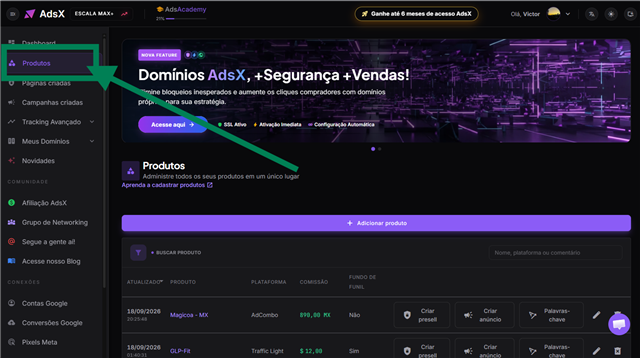
On the side menu, open Products.
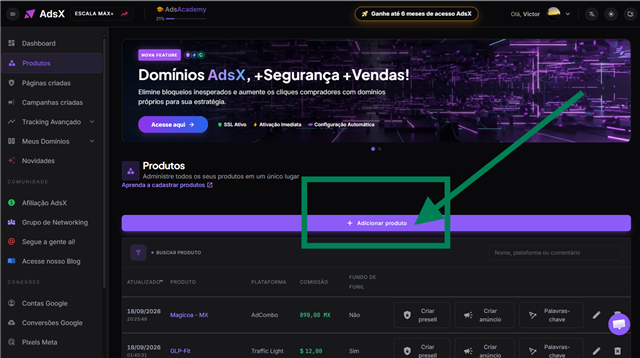
Click + Add product, right above the list.
Fill in the product details:
- Name — how the product shows up on your list. You can copy it from the platform's affiliate page.
- Commission — how much you make per sale.
- Your affiliate link — the link you promote. It's how AdsX recognizes the product on your sales.
- Platform — where the product is sold, such as Clickbank, BuyGoods, Braip or AdCombo.

To finish, choose how you want to continue:
- Save — the product joins the list and is ready whenever you need it.
- Save and analyze with AI — saves it and opens the AdsX-IA product analysis right away.
- Save and create presell — saves it and opens the pre-sell creation for that product right away.
That's it: the product is registered. On its row, the Start button opens the product's actions screen, where you analyze it with AI, create the pre-sell, create the Google Ads campaign and search for keywords.
The screenshots above show the interface in Portuguese. The fields and buttons are in the same order in English.
Find a product on the list
All of your products live on a single list, and you can arrange it however you need:
- Sort — click the Updated, Product, Platform or Commission header. Click it again to reverse the order.
- Search — the field at the top of the list finds a product by its name, its platform or its note.
- See the rest — the list opens with 50 products; the Show more button at the end loads the next ones.
Watch the video
The AdsAcademy lesson walks through the whole thing (in Portuguese):
Frequently asked questions
Is there a limit of products?
No. You can register as many products as you want, on any AdsX plan.
Can I register products from any platform?
Yes. AdsX accepts products from every platform, local or international — there is no platform restriction for registering products or creating pre-sells and ads.
Do I need one domain per product?
No. A single domain serves all of your products, in any country.
What happened to the "In Analysis" tab?
It's gone, and all of your products now live on a single list. If you had products in analysis, the Download products in analysis button at the top of the screen hands you that list as a spreadsheet.
Updated on: 20/10/2026
Thank you!