How to set up conversion reporting for NewsBreak
In 4 steps, every sale from your NewsBreak ads is sent to your account automatically.
Audio in Portuguese, English subtitles available.
You only do this once. No need to repeat it for each presell, product or domain: once connected, every sale from NewsBreak, on any presell and any domain, is sent automatically.
1. Create the event in NewsBreak
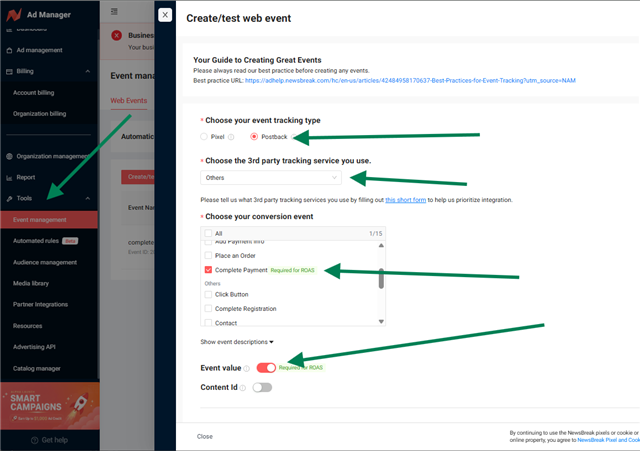
In Tools > Event management > Web Events, click Create/test web event and select:
- Postback
- Others
- Complete Payment
- Event value on
2. Copy the test link
In Test URL, paste the link of any presell created in AdsX, with this ending:
?newsbreak_cid=__CALLBACK_PARAM__
This presell is only used to check that the integration works — afterwards, you can use any presells you want in your ads.
Copy the link that shows up right below, in Actual test URL.
3. Paste it in AdsX
In Connections > NewsBreak conversions, click Add NewsBreak account. Paste the link, click Send test and then Save.
4. Save in NewsBreak
Go back to NewsBreak, tick the terms box and click Save.
Done! From now on, all your NewsBreak sales are sent automatically — from any presell, product or domain.
Important
- Use the ending
?newsbreak_cid=__CALLBACK_PARAM__in the URL of all your ads. - If you already use the ClickBank integration with NewsBreak, keep only one of the two on.
Updated on: 15/09/2026
Thank you!