How to grant the AdsX team access to your Google Ads account
Some things only show up inside your Google Ads account, like the import of your conversions. When we need to check one of them, we ask for access to your account: it takes 1 minute and you can remove it whenever you want.
Only do this if the AdsX team asks you to. The request always comes through the AdsX support chat, and the only email we use is minerxstrategy@gmail.com. If anyone asks for access to a different email on behalf of AdsX, don't send the invitation and contact support.
1 — In Google Ads, click Admin in the left menu
2 — Open Access and security, go to the Users tab and click the + button
3 — In Email, type minerxstrategy@gmail.com
4 — Under the account access level, select Admin
It's the only level that lets the team view and fix the account's data connections, where your conversions come in.
5 — Click Send invitation
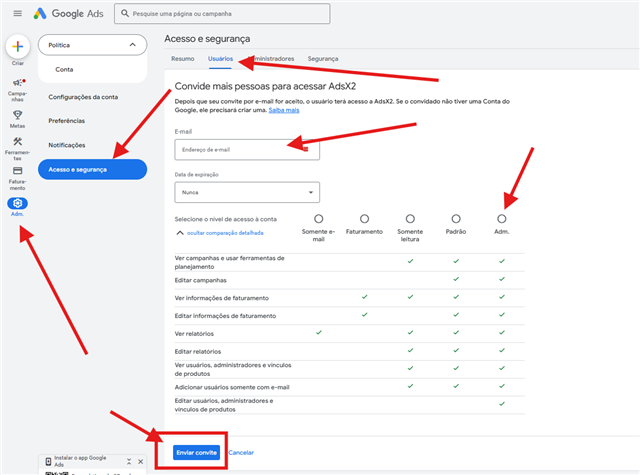
The screenshot shows the Google Ads interface in Portuguese; the steps are the same in English.
Done. Let us know in the chat that you sent the invitation. Once the team accepts it, Google will email you.
Tips
- Want the access to end on its own? Set an expiration date before sending the invitation.
- To remove the access, go back to Admin → Access and security → Users and remove minerxstrategy@gmail.com. You can do it as soon as the support case is closed.
- The team uses the access only for what was agreed in the support chat.
Updated on: 10/09/2026
Thank you!