How to obtain the necessary values for Traffic Light COD form presells
The COD with Form pre-sell for Traffic Light asks for three values that live in your network panel. This article shows where each one is.
API key
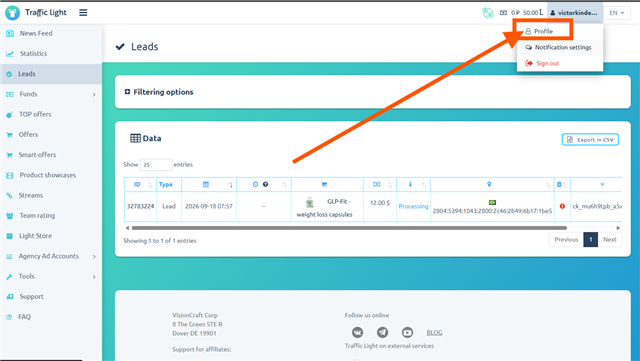
In the Traffic Light panel, click your name in the top right corner and choose Profile.
Open the API tab and copy Your API KEY using the button on the right.
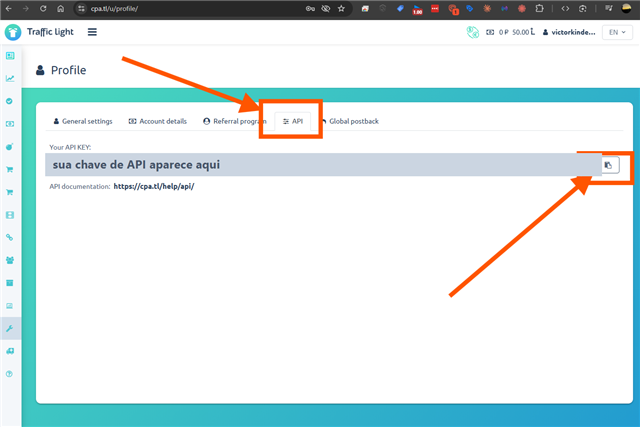
Treat this key like a password. It gives access to your account on the network — never share it.
Campaign code
Go to Offers and find the offer you promote. The campaign code is the number shown before its name.
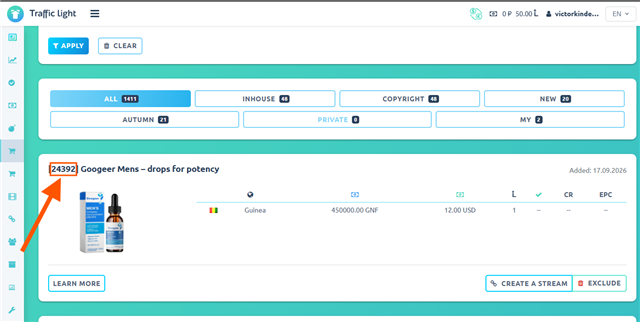
Careful: it is the number, not the stream code. The stream has a code with letters (for example
RnwTbzKJ), and it does not work in this field.
Affiliate link
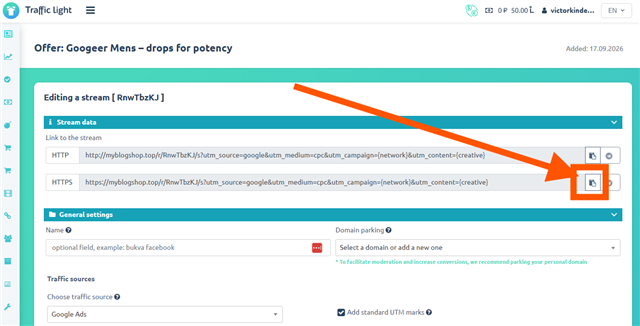
Still on the offer, click Create a stream (or open a stream you already have) and copy the HTTPS link. That link is what takes the visitor to the offer after the order.
Amount with currency
This is the price the buyer sees on the page, in the format of the country you advertise in — for example 790 MXN for Mexico. Use the same price as the offer, so the visitor doesn't run into a different amount later.
Where these values go
On the form, fill in API Token (the key), Campaign Code (the offer number), Your Affiliate Link and Amount with currency. Then click Create presell and choose the domain and the page address. The page shows up under Created pages.
Tips
- The product image already comes with the page. It starts with a drawing in place of the photo; swap it for the real one in the visual editor, under Created pages.
- Changed your API key on Traffic Light? Create the pre-sell again. A published page keeps the details it was created with.
- The campaign code only accepts numbers. If you paste the stream code, AdsX warns you right away.
- Advertise the pre-sell link, not the affiliate link directly: it is the pre-sell that captures the order and sends the visitor to the offer.
Updated on: 19/09/2026
Thank you!